Intro to sensors and MATLAB (LED)
Jan, 2022
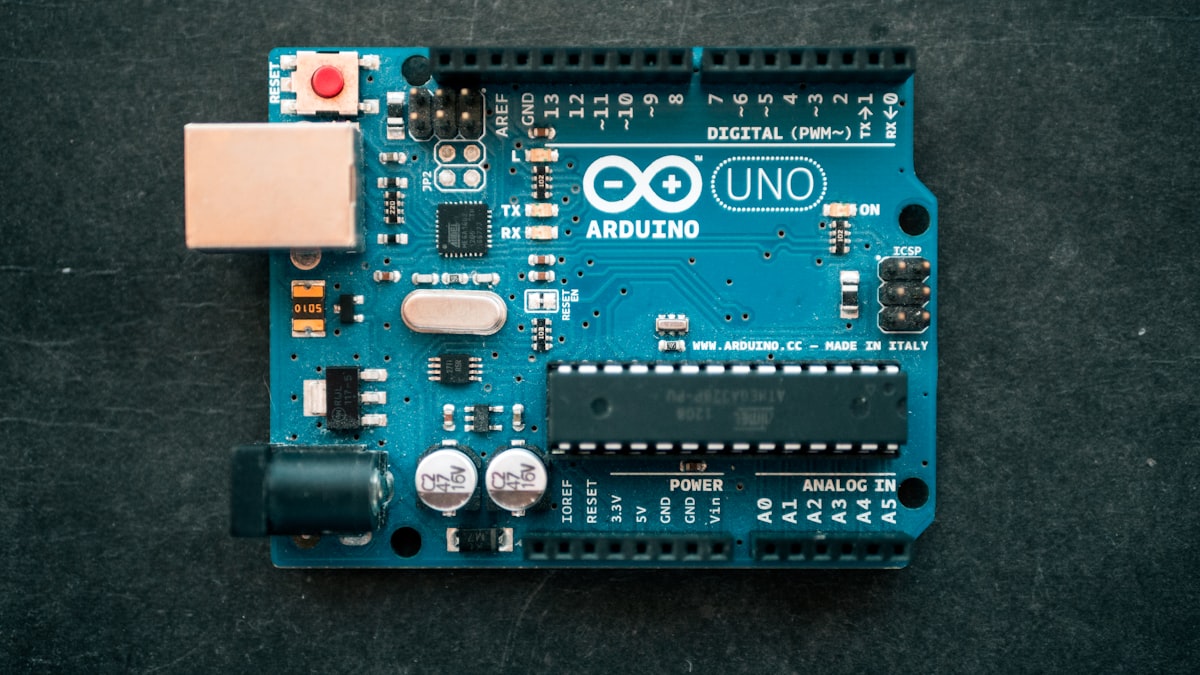
The purpose of this lab was to design a circuit with an Arduino board to turn an LED on through a MATLAB code. The Arduino board was created in 2005 by Massimo Banzi at the Interaction Design Institute in Ivrea, Italy. The purpose of the Arduino project was to develop a low-cost opportunity for students and engineers to design devices such as alarm security systems, remote controls, etc. The Arduino board is a circuit programmer that allows users to connect it to a breadboard with the necessary circuit components. The Arduino board consists of several major components, including a micro USB connector, a power jack, 20 digital input/output pins, 16 MHz crystal oscillator, an ICSP header, and a reset button. The Arduino board is then connected to different devices like a computer to download programs onto the board and then complete various operations or generate a functioning circuit using computer codes (in this case, MATLAB codes).
One of the main components used with an Arduino board for this lab was an LED. LED stands for light-emitting diode. The first LED invented was an infrared light LED in 1961 by Robert Biard and Gary Pittman. The first visible-light LED was then created the following year, in 1962 by Nick Holonyack. LEDs are semiconductor light sources that give light as current flows through them. LEDs can function with an Arduino board through the input of digital signals. A digital signal is a signal in which the original information is converted into a string of bits before being transmitted. Digital Signals are advantageous because they convey information with less distortion, digital circuits can be produced at low costs, and are less prone to error since they are not manually done. Digital signals must be generated through a code hence why MATLAB is used. The purpose of using MATLAB in conjunction with the Arduino board and the LED is to provide the Arduino board with a script for the LED to function, like turning on or off.
Materials:
- MATLAB Software
- Arduino Software Package
- Micro-usb Cable
- Arduino Leonardo
- Breadboard
- 4 jumper wires
- 1 LED
- 1 1-k resistor
The MATLAB software was installed along with the Arduino Software Package and connected to the arduino board before setting up the circuit. Firstly a jumper wire was used to connect one of the ports on the arduino board, in this experiment we used port 13, to a space on the power rail. Next another jumper wire was placed 5 spaces vertically left from the first jumper wire with its second end placed on one of the spaces along the circuit area of 22i. The purpose of this wire is to serve as a connection between the port and the resistor. After the second wire, the 1k ohm resistor was placed horizontally ensuring that one of its ends is on one space above the ending of the jumper wire in the circuit area. Next the LED was placed next to the resistor ensuring that the anode is placed one space above the open end of the resistor for connection. Another jumper wire (yellow jumper wire) was used afterwards where one end was placed one space below the cathode of the LED and the other end on a space along the ground rail. The purpose of this wire is to ensure that there is a connection between the LED and the wire that is going to ground the circuit. Lastly to ground the circuit a jumper wire was placed with one end on one space to the right of the yellow jumper wire and the other end to the ground port (GND) of the arduino board. Finally a MATLAB script was typed to turn on the LED and the Micro-USB cable was used to connect the arduino board with the circuit to the PC computer.
Circuit Design:
/led-circuit-design.png)
MATLAB code:
/matlab-led.png)
This lab accomplished the design of a closed circuit to turn on an LED light by utilizing a breadboard, Arduino, and MATLAB. The MATLAB code used to create such a system includes instructions to turn off the LED after a few seconds of it being turned on. Images of the labeled design and actual circuit and the MATLAB code used to perform this experiment are included below.
LED ON:
/led-circuit-on.jpeg)
This lab aimed to design a circuit with an Arduino board to turn on an LED utilizing the computer software MATLAB. The first task was to download the MATLAB software to a physical computer. Once we were able to run MATLAB commands using its interface successfully, the second task was to download and install all software packages for the Arduino to connect the MATLAB to be used to turn on an LED. The following step was to connect the LED to the digital output port of Arduino and build a closed circuit for current to flow through to turn on the LED. One initial error made during the previously stated step was building an open circuit. We missed the connecting node from the LED to the ground during the circuit's initial wiring. We resolved this issue by adding an additional wire that allowed for current to flow through the resistor and subsequently to the LED. The subsequent step included writing the MATLAB code that would provide the instructions to the Arduino to turn the LED on. Some other possible sources of error include but are not limited to MATLAB code errors, for example, placing the wrong port name on the code or not assigning the Arduino board before entering the code (e.g., a=arduino), or obstacles while connecting the Arduino board to the computer, for example, not selecting the correct name of the Arduino board (selected UNO instead of Leonardo), hence no connection would take place. All possible errors were considered, and measures were taken to provide a straightforward method to turn on an LED using MATLAB and the Arduino board.
During the entire lab, several achievements included turning an LED on and understanding the basics of how the Arduino board works with MATLAB scripts. Another achievement during this lab was successful teamwork with the group. The lab assignment also worked as an excellent refresher to get back into working with MATLAB coding. This lab also provided many learning opportunities like how to enable MATLAB to detect an Arduino board and how to connect the Arduino board to the computer. The lab also served as a review of the basics of circuits when figuring out how to connect the resistor and the LED to create a closed circuit. The lab also helped to integrate our knowledge of circuit theory with MATLAB coding skills. The courses on circuits and MATLAB were initially taken separately, so seeing them work together provided a greater understanding of the two.
References:
- Analog vs. Digital Signals: Uses, advantages and disadvantages: Article: Mps. Analog vs. Digital Signals: Uses, Advantages and Disadvantages | Article | MPS. (n.d.). Retrieved January 25, 2022, from https://www.monolithicpower.com/en/analog-vs-digital-signal
- Arduinoboardleonardo. Arduino. (n.d.). Retrieved January 25, 2022, from https://www.arduino.cc/en/Main/Arduino_BoardLeonardo
- Author john. (2014, March 27). Invention story and history of development of Arduino. Electronic Circuits and Diagrams-Electronic Projects and Design. Retrieved January 25, 2022, from https://www.circuitstoday.com/story-and-history-of-development-of-arduino
- Bellis, M. (2021, February 14). Who invented led or the light emitting diode? ThoughtCo. Retrieved January 25, 2022, from https://www.thoughtco.com/led-light-emitting-diode-1992081
- Dictionary.com. (n.d.). Digital Signal Definition & meaning. Dictionary.com. Retrieved January 25, 2022, from https://www.dictionary.com/browse/digital-signal
- Getting started with Matlab Support Package for Arduino hardware. Getting Started with MATLAB Support Package for Arduino Hardware - MATLAB & Simulink. (n.d.). Retrieved January 25, 2022, from https://www.mathworks.com/help/supportpkg/arduinoio/ug/getting-started-with-matlab-support-package-for-arduino-hardware.html
- What is an LED? | leds magazine. (n.d.). Retrieved January 25, 2022, from https://www.ledsmagazine.com/leds-ssl-design/materials/article/16701292/what-is-an-led